![]() |
| |||||||||||
![]() |
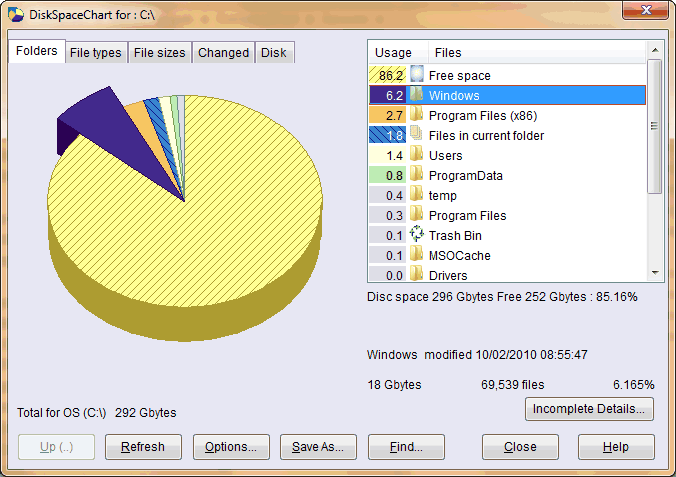
Tools & Utilities / DiskSpaceChartDiskSpaceChart allows you to quickly and easily work out disk space utilisation. This small utility helps you work out where all your disk space has gone. Ever wondered how much space is taken up by your 'Windows' folder. Now you can do just that without using a calculator !
An enhanced version of this utility is available for purchase. Follow this link for more information. The purchased version removes the occasional requests to purchase and improves speed of displaying data. Space Chart installs as an extension to the standard Windows Explorer. To access the chart option, run Explorer and select a folder or disk drive. Click on the folder with the right mouse button and the menu option Chart... . The easy to use chart is immediately displayed. Look at the screen shots at the bottom of this page to see the information presented. Version 2.3.1 : April 2008 Download the installer dskchart.exe (354 Kb) file by clicking the link below.
When complete run the downloaded dskchart.exe installation program file and follow the installation instructions.
Version 2.3 Vista version (32 and 64 bit) updates (April 2008)
Select Chart... from the standard Explorer context menu![]() Displaying ResultsShowing the proportion of space occupied under Program Files
Any suggestions, queries or comments contact us by E-Mail support@silurian.com.
|
|||||||||||